Manage your subscription
Upgrade, downgrade, pay or cancel: it all lives in one place, and you are never locked out of the invoices and documents you already have.
Where to manage it
Open Settings and go to the Plan tab. The subscription belongs to the account owner, so this tab is the owner’s to manage.
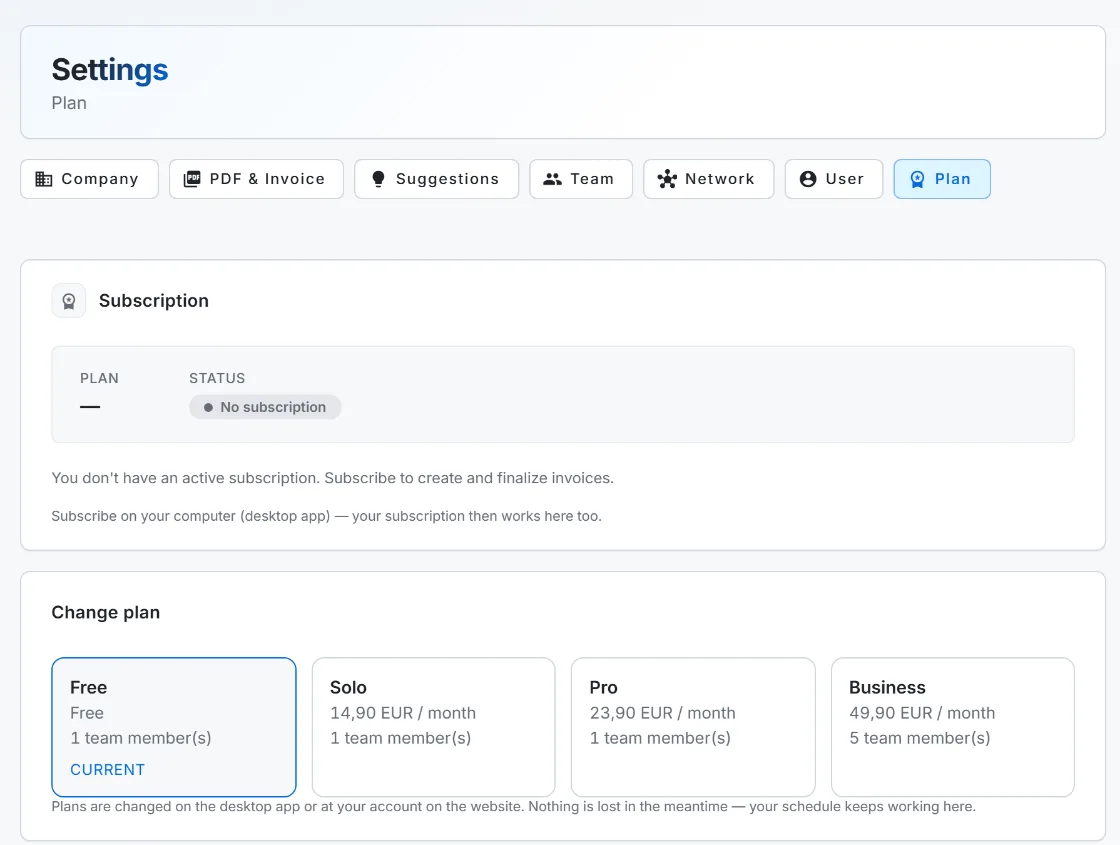
Change your plan
- Upgrade: pick the higher plan and pay. It takes effect right away.
- Downgrade to another paid plan: pick it, and the change applies at your next renewal (so you always keep what you already paid for).
- Cancel: choose Cancel, and you keep full access until the end of the paid month.
- Change your mind: choose Resume, or “keep my plan”, before the period ends to clear a scheduled cancellation or downgrade.
Paying for a plan happens on the desktop app or the web, not on a phone. You can still manage everything else from anywhere.
When can I cancel, and what happens to my data?
You can cancel any time. You keep working until the end of the month you already paid for; after that your account drops to the Free tier. Free still lets you open, print and export every invoice and document you already have; only creating new ones needs a paid plan again. Nothing is deleted by cancelling.
When can I cancel, and what happens to my data?
You can cancel any time from Settings, Plan tab. You keep full access until the end of the month you already paid for. After that your account drops to the Free tier. You can still open, print and export every invoice and document you already have; only creating new ones needs a paid plan again.
Do I lose my invoices if I cancel or stop paying?
No. Invoices and documents are statutory records, so reading, printing and exporting them stays available on every tier, including Free.
Can I change plans on my phone?
You can manage most things anywhere, but paying for a plan happens on the desktop app or the web, not on a phone.