Add a contractor or pair with an agency
Freelance guides and tour agencies often work together without sharing a set of books. In BucketBill they stay in their own separate organisations and connect with a pairing code, then pass jobs back and forth.
How pairing works
A contractor keeps their own organisation. Pairing simply creates a link between the two sides so the agency can send job requests. No clients, invoices or figures are shared, and a contractor never uses up one of the agency’s team seats.
Pair the two sides
- Contractor: open Settings → Network and generate a pairing code. It’s shown as text and a QR code, and it lasts 15 minutes.
- Hand the code (or QR) to the agency directly.
- Agency: an admin opens Settings → Network and redeems the code within 15 minutes.
- Done. The two organisations are linked.
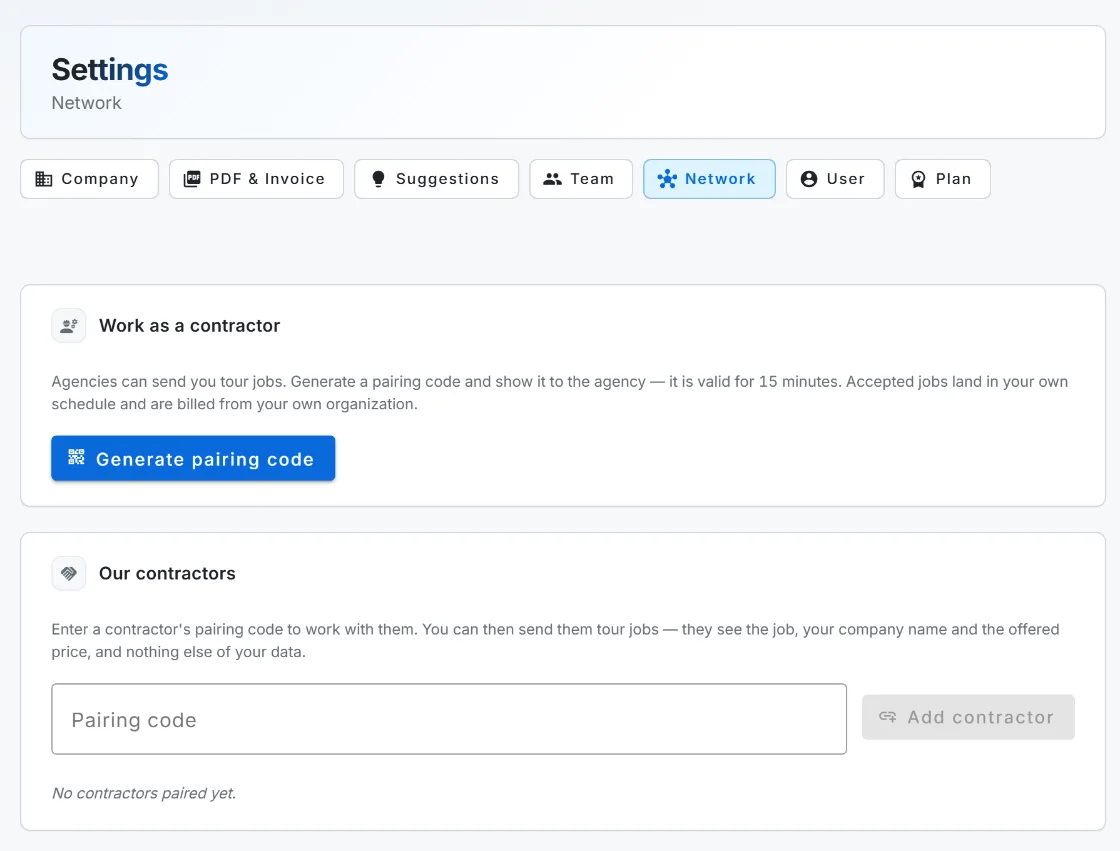
To generate a code, the contractor needs to be the owner of their own organisation. On the agency side, an admin or owner redeems it. Pairing works on every plan.
Send and accept jobs
Once linked, an agency admin can send a job request: the tour, when and where, how many people, and the agreed price. The contractor answers it under Requests. Accepting a job is free and turns it into a booking in the contractor’s own organisation; billing for it follows your normal plan when you invoice.
Either side can end the link at any time from the Network tab.
Does pairing share my data with the agency?
No. A contractor stays in their own organisation. Pairing only lets the two sides exchange job requests; your clients, invoices and figures are not shared.
Does a contractor use up a team seat?
No. Contractors are external and cost no seat. Pairing works on every plan.